
Key Points to Remember
Forced Authorization Code (FAC) requires users to enter a numeric code before CUCM routes a call through a restricted pattern, adding a mandatory authentication layer to outgoing telephony.
Authorization levels range from 0 to 255; a user's code level must meet or exceed the route pattern's threshold for the call to proceed.
FAC records every successful authentication attempt in Call Detail Records (CDRs), enabling precise call accounting and billing by user or department.
FAC and Client Matter Codes (CMC) are complementary, not interchangeable: FAC controls access, CMC tracks billing.
Call forwarding is fundamentally incompatible with FAC because no user is present to enter the code.
FAC does not work with H.323 analog gateways, Single Number Reach, or parallel hunt groups.
Configuration requires creating codes in CUCM Administration, setting authorization levels, and enabling the "Require Forced Authorization Code" checkbox on the target route pattern.


Executive Summary
Forced Authorization Code (FAC) is a security and call-management feature built into Cisco Unified Communications Manager (CUCM) that requires users to authenticate before completing calls through restricted route patterns. When a call attempts to traverse a FAC-enabled pattern, the system prompts the user with a distinctive tone, waits for a numeric code entry, and only connects the call if that code's authorization level meets or exceeds the threshold configured on the pattern. This mechanism serves three simultaneous purposes: it blocks unauthorized access to sensitive call types such as international or long-distance calls, it creates detailed audit trails inside Call Detail Records for billing and compliance, and it enforces accountability by tying every restricted call to a named user or group. This guide explains in technical depth how FAC works inside CUCM and Cisco Unified CME, how to configure it step by step, how it differs from Client Matter Codes, what its real limitations are, and how to troubleshoot the most common failure scenarios.
Table of Contents
1. What Is a Forced Authorization Code?
The term "forced authorization code" appears in several unrelated domains, so context matters immediately. In payment processing, a forced authorization code is a transaction override entered manually by a merchant when a terminal cannot obtain real-time approval. In enterprise telephony, which is the focus of this guide, a Forced Authorization Code (FAC) is a numeric credential that CUCM requires a user to enter before completing a call through a restricted route pattern. The two uses share vocabulary but nothing else.
Within Cisco Unified Communications Manager and Cisco Unified CME environments, FAC functions as a gatekeeper for outgoing telephony. Administrators assign numeric codes to individual users or groups, configure authorization levels on those codes, and then flag specific route patterns as requiring FAC authentication. Any call that attempts to route through one of those patterns triggers an authentication prompt before CUCM processes the outgoing connection. This places active control over call types, call destinations, and call costs directly in the hands of the network administrator rather than leaving access open to any device on the dial plan.
The business case for FAC is straightforward. International calls, premium-rate numbers, and long-distance routes represent costs that most organizations want to control tightly. In environments with shared phones, reception desks, or hot-desking arrangements, it is otherwise impossible to know who made a specific expensive call, let alone to block unauthorized users from making it. FAC solves both problems simultaneously: it prevents the call from completing unless the user enters a valid credential, and it logs that credential into the Call Detail Record so the responsible party is traceable.
FAC is used across a broad range of institutional contexts. Universities restrict student access to certain call types while allowing faculty and staff unrestricted calling. Law firms and consulting businesses require authorization codes for client-specific calls that will be billed back. Multinational companies prevent branch office employees from making unauthorized international calls while permitting managers with higher-level codes to do so freely. The system is flexible precisely because its authorization levels are graduated, not binary.
One important point about the term "phone system authorization code" more broadly: FAC is a Cisco-specific implementation of a concept that exists in various forms across enterprise telephony platforms. Other PBX systems use similar mechanisms under different names, but the level of granularity, CDR integration, and LPCOR policy compatibility described in this guide are specific to the CUCM and CME ecosystems. If you are evaluating telephony platforms, FAC's depth of integration with Cisco's routing and accounting architecture is a meaningful differentiator worth understanding before making infrastructure decisions.
2. How FAC Works Inside CUCM: The Full Call Flow
Understanding FAC's call flow requires knowing how CUCM processes outgoing calls in general. Every outgoing call traverses a route pattern, which is a dial plan entry that tells CUCM how to handle a specific dialed number or range of numbers. When an administrator enables FAC on a route pattern, CUCM inserts an authentication step between the moment the user dials and the moment the call is actually routed outward.
The step-by-step sequence unfolds as follows. A user picks up their phone and dials a number that matches a FAC-enabled route pattern. CUCM signals the phone to play a distinctive stuttered dial tone, which is the system's prompt for the user to enter their authorization code. The user types their numeric code on the keypad. CUCM compares that code's configured authorization level against the authorization level set on the route pattern. If the user's level meets or exceeds the required threshold, the call proceeds and CUCM marks the CDR with the authorization code used. If the level is insufficient, or if the user enters an incorrect code, CUCM plays a reorder tone and the call does not connect.
The FAC timer plays a critical role in user experience. By default, CUCM uses the T302 inter-digit timer, set to 15 seconds, to wait for code entry after the prompt tone. Users who want to skip the wait can press the pound (#) key immediately after entering their code to force instant validation. This detail matters in training: users who are unfamiliar with FAC often hang up when they hear the prompt tone, believing the call has failed, rather than recognizing it as an authentication request.
CUCM's verification logic is strictly hierarchical, not exact-match. The system does not check whether the user's code matches the route pattern's code; it checks whether the user's authorization level is numerically equal to or greater than the route pattern's level. A user with level 30 can call through route patterns requiring levels 10, 20, or 30. This hierarchy is what gives administrators the ability to build graduated access policies without creating separate codes for every possible combination of user and call type.
In Cisco Unified CME environments, FAC integrates with Logical Partitioning Class of Restriction (LPCOR) policies, which classify endpoints, IP phones, analog phones, PSTN trunks, and IP trunks into groups. LPCOR policy determines which incoming calls from each group require FAC restrictions, enabling even finer-grained control over which devices and network segments are subject to authentication requirements. This integration extends FAC's utility well beyond simple outgoing call restriction into a full endpoint access control framework.
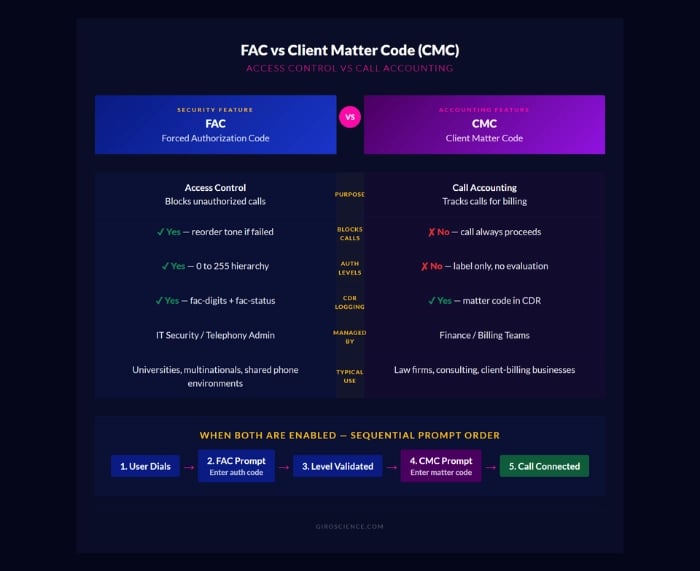
When environments deploy both FAC and Client Matter Codes simultaneously, CUCM processes them sequentially. The user hears the FAC prompt first, enters their authorization code, and only after successful FAC authentication does the system prompt for the CMC. This ordering ensures that security, controlled by FAC, is validated before accounting, handled by CMC, is captured.
4. Step-by-Step FAC Configuration in CUCM
Configuring FAC in Cisco Unified Communications Manager requires three sequential operations: creating the authorization codes, assigning their levels, and enabling FAC on the target route patterns. None of these steps is particularly complex individually, but the order matters and each step has specific constraints worth knowing before you begin.
Step 1: Navigate to the FAC management interface. In CUCM Administration, go to Call Routing > Forced Authorization Codes. This section lists all existing FAC codes and provides the Add New button for creating new ones.
Step 2: Create a new authorization code. Click Add New. The Authorization Code Name field accepts up to 50 characters and should be descriptive enough to identify the associated user or group without exposing sensitive details. Choose a naming convention you will use consistently across all codes, for example "EMP-FINANCE-01" or "MGR-SALES-WEST." The Authorization Code field itself must be numeric only (digits 0-9), with a maximum length of 16 digits. Codes must be unique across the entire CUCM cluster.
Step 3: Set the authorization level. Enter a three-digit value between 000 and 255 in the Authorization Level field. Follow your organization's pre-planned level scheme rather than assigning levels ad hoc. Save the record. Repeat for each user or group that requires a FAC code.
Step 4: Enable FAC on the target route pattern. Navigate to Call Routing > Route/Hunt > Route Pattern. Use Find to locate an existing pattern or click Add New to create one. In the Route Pattern Configuration window, locate the Require Forced Authorization Code checkbox and enable it. Enter the authorization level required to access this pattern in the Authorization Level field. Save.
Step 5: Validate the configuration. Test each newly configured route pattern from a device that should have access (correct level code) and from a device that should not (insufficient level or no code). Verify that CDR entries are created correctly for successful authentications by checking CDR Analysis and Reporting (CAR) after test calls. Also test the edge case where a user presses # immediately after the last digit of their code to confirm the timer override works as expected.
Step 6: Update dial plan documentation. This step is not optional. Every route pattern with FAC enabled, its authorization level, and the codes assigned to each user or group should be recorded in your organization's dial plan reference document. Undocumented FAC configurations become maintenance problems within months. Just as you would document any other security control, treat FAC code assignments and level schemes as configuration assets that require version control.
For Cisco Unified CME environments, the configuration path differs slightly but the principles are identical. FAC integrates with CME's LPCOR group assignments, so the configuration sequence also includes assigning endpoints to LPCOR groups and defining which groups require FAC for which incoming call types.
5. FAC and Call Detail Records: Accounting and Billing
One of FAC's most valuable but least discussed capabilities is its tight integration with CUCM's Call Detail Record system. Every successful FAC authentication creates a marked CDR entry that associates the call with the specific authorization code used. This transforms FAC from a simple access control feature into a comprehensive call accounting and audit tool.
The CDR fields added by FAC include two attributes in STOP records: fac-digits, which stores the authorization code actually entered, and fac-status, which records whether authentication succeeded or failed. These fields appear alongside standard CDR data including caller ID, dialed number, call duration, and trunk used, giving administrators a complete picture of each call's accounting context.
Cisco's CDR Analysis and Reporting (CAR) tool can process these enriched records to generate reports organized by authorization code, by user, by department, or by call type. Finance teams can use these reports to allocate call costs to cost centers. Compliance teams can audit which users accessed premium or international routes and when. Security teams can detect anomalies, such as a code being used from an unexpected device or at an unusual time, that might indicate a shared or compromised credential.
In practical billing scenarios, the fac-digits field functions as a user identifier for calls made from shared phones. A reception desk phone or a conference room phone has no inherent user identity, but when every outgoing call requires FAC authentication, the CDR captures exactly who used that device for each call. This capability is particularly valuable for professional services firms that need to bill client communications accurately, and for academic institutions that need to track departmental telephony costs.
Accessing CDR data for FAC analysis uses standard CUCM commands. "show call active voice" displays active calls including FAC information, while "show call history voice" retrieves completed call records. These commands are most useful for real-time troubleshooting; for longer-term reporting, CAR is the appropriate tool.
An important nuance for long-distance call restriction: FAC's CDR integration means that call accounting cucm implementations can use FAC not just to block calls but to permit them selectively while maintaining full auditability. Rather than blocking all international calls, an organization might permit them through a FAC-required route pattern, capturing the code used in the CDR so that unexpected international calls surface immediately in reporting. This is a more operationally flexible approach than hard blocking for organizations where some international calling is legitimate.
The intersection of FAC, CDR, and voice biomarker AI systems represents an emerging area of interest: as AI-driven analytics are increasingly applied to enterprise communication data, FAC-enriched CDRs become a richer dataset for behavioral analysis, anomaly detection, and productivity insights, provided the appropriate privacy governance frameworks are in place.
6. FAC vs Client Matter Code: Key Differences
FAC and Client Matter Code (CMC) are frequently confused because they share surface-level similarities: both require users to enter a numeric code after dialing, both are configured in CUCM Administration, and both generate entries in Call Detail Records. The confusion is understandable, but the two features serve fundamentally different organizational purposes.
FAC is an access control mechanism. CMC is an accounting mechanism. This single distinction explains every behavioral difference between them.
When a user dials through a FAC-enabled route pattern without a valid code, the call does not connect. The system actively enforces access, making FAC a security boundary. When a user dials through a CMC-enabled route pattern and enters any recognized matter code, the call connects regardless of which code was entered. CMC does not evaluate authorization levels and does not block calls based on code validity. It records the code in the CDR for billing purposes and then proceeds.
The practical consequence: an organization that wants to prevent unauthorized international calls must use FAC, not CMC. An organization that wants to allocate all calls to client billing codes without restricting who can call where should use CMC. An organization that wants to restrict access and track billing simultaneously should use both features in combination, with CUCM presenting the FAC prompt first, followed by the CMC prompt after successful authentication.
Configuration differences also reflect the different purposes. FAC codes carry authorization levels that are compared against route pattern thresholds. CMC codes carry no such level; they are simply identifiers that CUCM passes through to the CDR. FAC codes must be numeric and unique; CMC codes have similar format constraints but serve purely as labels.
Audit and reporting differ as well. FAC CDR data includes authentication success/failure status, which makes it useful for security auditing. CMC CDR data includes the matter code used, which makes it useful for client billing reports in CAR.
The table below summarizes the key differences:
Both features are documented extensively in Cisco's official CUCM Feature Configuration Guide, and organizations implementing either feature should consult the guide for their specific CUCM version, as configuration paths and supported features vary between releases.
Common Mistakes to Avoid
Using incremental levels of 1 instead of 10. Setting levels as 1, 2, 3, 4 instead of 10, 20, 30, 40 eliminates any room to insert new levels between existing ones later. Always use increments of at least 5, and 10 is the widely recommended practice.
Enabling FAC on route patterns used for call forwarding destinations. This will silently break call forwarding for any extension that forwards to a number routed through that pattern. Test forwarding numbers before deployment.
Not documenting the authorization level scheme. Within a year of deployment, personnel changes and new route pattern additions will make an undocumented FAC scheme nearly impossible to maintain consistently. The level scheme is a security document and should be treated as one.
Configuring FAC codes with the same digits as speed-dial targets. While CUCM will not confuse them at the protocol level, users may inadvertently enter speed-dial numbers when prompted for FAC codes if the digits are similar. Use a distinct code format that is visually or numerically different from your dial plan ranges.
Forgetting to test with the pound (#) key. The inter-digit timer override is a critical user experience feature. Include it in user training and in pre-deployment testing to avoid support calls from users who do not know to press # and experience long waits.
Assigning identical codes to multiple users. FAC codes must be unique, but CUCM may not prevent duplicates in all versions. Duplicate codes undermine the accountability purpose of FAC entirely, since CDR records cannot be attributed to a specific individual.
Assuming FAC protects against all unauthorized call types. FAC only applies to route patterns where it has been explicitly enabled. A dial plan with FAC on international patterns but not on premium-rate domestic patterns leaves the latter unprotected.
FAQ
1. What is a Forced Authorization Code (FAC) and how is it different from a regular PIN?
A Forced Authorization Code is a numeric credential specific to enterprise telephony systems, particularly Cisco CUCM and CME, that controls which call types a user is permitted to complete. It differs from a general PIN in two important ways. First, it carries an authorization level between 0 and 255 that determines which route patterns it can unlock, not just whether authentication succeeds. Second, it is recorded in Call Detail Records every time it is used, creating a permanent, attributable audit trail of which user completed which restricted call and when. A PIN typically grants or denies access to a system as a whole; a FAC code grants graduated access to specific telephony routes based on a hierarchical level system.
2. What is FAC in CUCM specifically?
In Cisco Unified Communications Manager, FAC is a feature administered under Call Routing > Forced Authorization Codes. It allows administrators to create numeric codes tied to users or groups, assign those codes authorization levels, and then require those levels on specific route patterns. CUCM intercepts any outgoing call matching a FAC-enabled route pattern, plays a distinctive prompt tone, waits for code entry within a configurable timer window (default 15 seconds), validates the code against its stored level, and either connects the call or plays a reorder tone. All of this happens within the existing CUCM dial plan framework without requiring additional hardware.
3. Why is FAC not working with call forwarding?
Call forwarding and FAC are architecturally incompatible because FAC requires a live user to hear the prompt tone and enter a code. When a call is forwarded automatically, CUCM routes it through the dial plan without any user interaction. If that forwarding path traverses a FAC-enabled route pattern, CUCM issues the authentication prompt but receives no response, and the call fails. The solution is to ensure that external call forwarding destinations route through non-FAC route patterns. If that is not possible within the existing dial plan, a dedicated route pattern for the forwarding destination without FAC enabled is the standard workaround.
4. How does the FAC authorization level hierarchy work in practice?
The hierarchy works on a single rule: a user's code level must be numerically equal to or greater than the route pattern's configured level for the call to be permitted. For example, if your organization configures intrastate long-distance at level 10, interstate at level 20, and international at level 30, a user with a level 20 code can make both intrastate and interstate calls (their level meets or exceeds both thresholds) but cannot make international calls (their level 20 is less than the required 30). This means a single code grants access to all route patterns at or below its level, which simplifies administration considerably since you do not need to create separate codes for every combination of user and permitted call type.
5. What is the difference between FAC and Client Matter Code (CMC)?
FAC controls whether a call is permitted to proceed. CMC identifies which client or matter the call should be billed against. FAC uses authorization levels and blocks calls from users whose level is insufficient. CMC records whatever matter code the user enters without evaluating it against any threshold, and the call always proceeds after a valid CMC entry. When both are used together in CUCM, FAC is always prompted first (security gate), and CMC is prompted second (billing capture). A user who fails FAC authentication never reaches the CMC prompt.
6. Can FAC codes be used on Cisco soft phone clients?
Not with the standard prompt tone mechanism. Cisco IP soft phone clients cannot play the FAC prompt tone that CUCM uses to signal code entry. However, users on soft phone clients can still enter their FAC code by waiting approximately two seconds after dialing before typing their code on the keypad. CUCM will process the code entry even without the prompting tone. This behavior should be documented in your organization's user training materials for soft phone deployments, as users who are unaware of it will simply experience the call failing silently.
7. How does FAC appear in Call Detail Records (CDR)?
Successful FAC authentication adds two fields to the CDR STOP record: fac-digits, which contains the actual authorization code entered, and fac-status, which records whether authentication succeeded. These fields are visible in standard CDR exports and can be processed by CUCM's CDR Analysis and Reporting (CAR) tool to generate reports by user, department, or authorization code. Organizations can use these reports for call cost allocation, compliance auditing, and anomaly detection (for example, identifying codes used from unexpected devices or at unusual hours). The fac-digits field is what makes FAC codes useful as user identifiers for calls made from shared or anonymous phones.
8. What should I do if FAC is blocking calls it should allow?
Start by confirming the user's code authorization level versus the route pattern's required level. The most common cause of unexpected blocking is a code whose level is lower than expected, or a route pattern whose required level was set higher than intended. Next, verify that the user is entering the code correctly, including any leading zeros. Check whether the T302 inter-digit timer may be expiring before the user finishes entering their code; if so, advise the user to press # immediately after the last digit. If the issue persists, confirm that the route pattern configuration is saved correctly and that it matches the number range the user is dialing. Finally, check CUCM database replication status if this is a multi-subscriber cluster, as replication failures can cause inconsistent code validation across nodes.
Conclusion
Forced Authorization Code is one of those enterprise telephony features whose true value only becomes clear when you examine it at the architectural level rather than the surface level. At the surface, it looks like a call restriction tool. At the architectural level, it is a unified framework for access control, call attribution, cost management, and audit compliance, all integrated into CUCM's native dial plan and CDR infrastructure without requiring additional systems.
The authorization level hierarchy, the CDR integration, the complementary relationship with Client Matter Codes, and the specific limitations around call forwarding and device compatibility are all design choices that reflect a coherent philosophy: telephony access should be as granular, auditable, and administratively scalable as any other enterprise security control. Understanding those choices, rather than treating FAC as a checkbox feature, is what separates a well-maintained telephony deployment from one that gradually drifts out of alignment with its security and accounting requirements.
For organizations evaluating Cisco CUCM as a telephony platform, FAC's depth of integration with the dial plan and CDR system is a meaningful capability that many competing platforms do not match at the same level of granularity. For organizations already running CUCM, revisiting your FAC configuration, authorization level scheme, and documentation is worthwhile maintenance, particularly after significant headcount changes or dial plan restructuring.
The principles of layered access control and attributable authentication that FAC implements in telephony connect to broader trends in enterprise security architecture, including the wearable tech and biometric monitoring frameworks emerging in other domains, where similar questions of user attribution, access level hierarchy, and audit trail completeness are being answered with new technical approaches. The underlying logic is the same: access should be controlled, attributed, and auditable. FAC has been delivering that in enterprise telephony for decades.
Sources and References
Cisco Systems. Cisco Unified Communications Manager Feature Configuration Guide, Release 12.5(1).
Cisco Systems. Cisco Unified CME Administration Guide, Forced Authorization Codes.
Cisco Systems. Call Detail Records Administration Guide for Cisco Unified Communications Manager.